A reading list in Notion stays pleasant when adding a book is quicker than opening a new row and typing. The row itself is easy. What takes the time is the cover, the author, the page count, and the publication year, copied out of another tab so the gallery does not look empty.
That is what I was missing. I already liked Notion. I wanted the shelf I already lived in to look finished after one search, and I only wanted another app if it could do something Notion could not.
I built NotionReads for my own reading list. Try the live demo whenever you like. No signup needed. The same shelf is on this public Notion page.
What you type when the database is blank
A homemade tracker starts as an inline database. You add Title, Author, Page Count, Status, and Rating, then you paste a cover URL into the page icon. I wrote that setup up as a free build tutorial. By the end of it I was tired of entering every detail and linking every cover by hand, so I built a search that would do it for me.
Other readers describe the same stuck point. On a Notion book-tracking thread, one person keeps a simple database (title, author, series, status, rating). Another bought a template that fills the book data in when they type the title. People are asking to stop typing the details every book already has.
Some of the workarounds are small automations. Thomas Frank’s Pipedream book scanner takes an ISBN and writes Author, Publish Year, Page Count, and ISBN-13 into Notion, so you can skip the copyright page. That is lovely when the book is in your hands and has a barcode. When you only remember a title, it cannot help, and the cover is still something you attach yourself.
A blank database is the right place for a custom status, a loan log, or a trope tag. For the first minute with a new book, I wanted something kinder.
Goodreads keeps the list. It does not live in Notion.
Goodreads holds shelves, ratings, and reviews. On March 28, 2013, Amazon announced that it had agreed to acquire Goodreads. The press release did not disclose the terms, and it said the deal was expected to close in the second quarter of 2013. For a lot of readers the practical result is familiar: the library they have been keeping sits in that product, and the way to take it with you is an export.
While you are signed in, Goodreads can export the library as a CSV from the import/export page. Notion can turn that file into a database. The current help doc says to open Settings → Import → CSV, or to type /csv on a page, then map the columns to properties. Notion adds the rows from the file and leaves rows you already have as they are. The walkthrough is Import data into Notion.
I treat that CSV as a backup. It is rarely a gallery full of covers. Exports are uneven, and a missing ISBN is how a book lands in Notion without a cover. In the Goodreads import guide I still walk through the export, then the path I built so you can fill those gaps without pasting image URLs.
On the homepage I describe that import as moving the library over and finding missing information that is not up to date in Goodreads. After you sign in, you upload the file on the Goodreads import page.
StoryGraph is a real tracker. It is still a different app.
The StoryGraph is where a lot of people go when Goodreads feels stale. The iOS app listing describes a free tracker that imports Goodreads shelves (currently reading, read, to-read, and did-not-finish), shows charts, recommends books, filters by mood and pace, and supports reading with friends. I think those are good reading-app features. Your notes still live in Notion, and StoryGraph does not put the shelf on that page.
StoryGraph Plus is optional. The yearly Plus page, in USD, lists $49.99 a year, which the page equates to $4.17 per month, billed annually, and calls two months free compared with monthly billing. The same page offers a 30-day free trial that ends on its own. No payment details are required, and Plus continues only if you sign up again. The App Store listing also shows a monthly purchase at $4.99 and the annual purchase at $49.99.
Plus includes custom charts, extra stats filters, wrap-up graphics for a date range you choose, a way to compare two slices of your library, and year-on-year charts when you compare two years. If you want mood filters and a dedicated stats site, StoryGraph is the one I would look at. If you want the book, the cover, and your notes in the workspace you already open, that is what I built.
What one click fills in
On the homepage I describe the add as no manual data entry, with access to over 100 million titles, and one click to put the book and its data in your Notion. The line there is “Add any book and all of its data to your Notion with one click.”
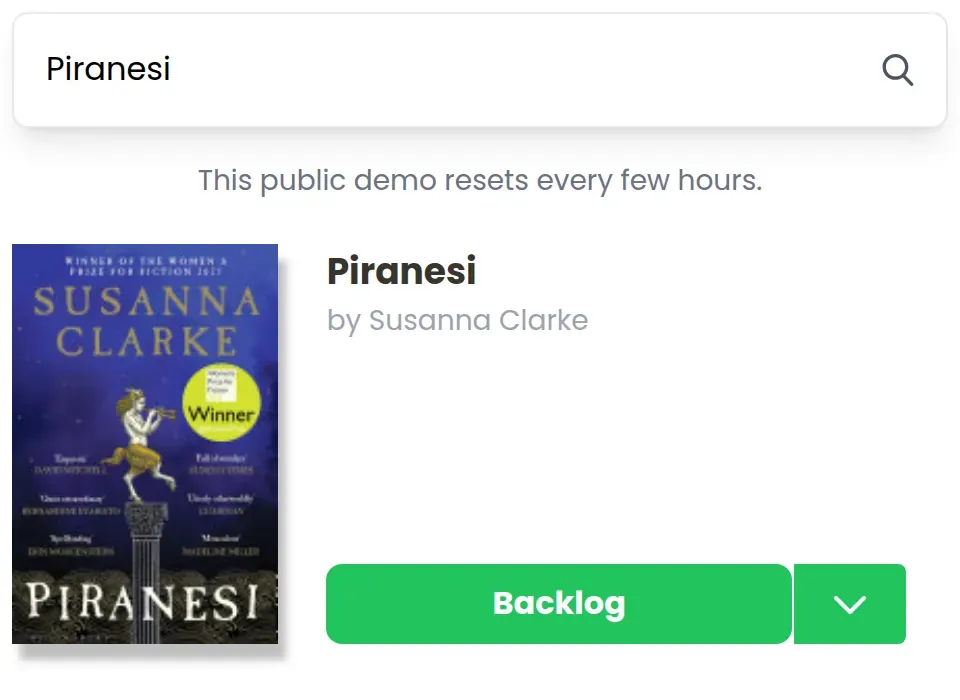
Search for a title on the live demo. The result comes back with a cover, an author, and a description before you add it. This is Piranesi:
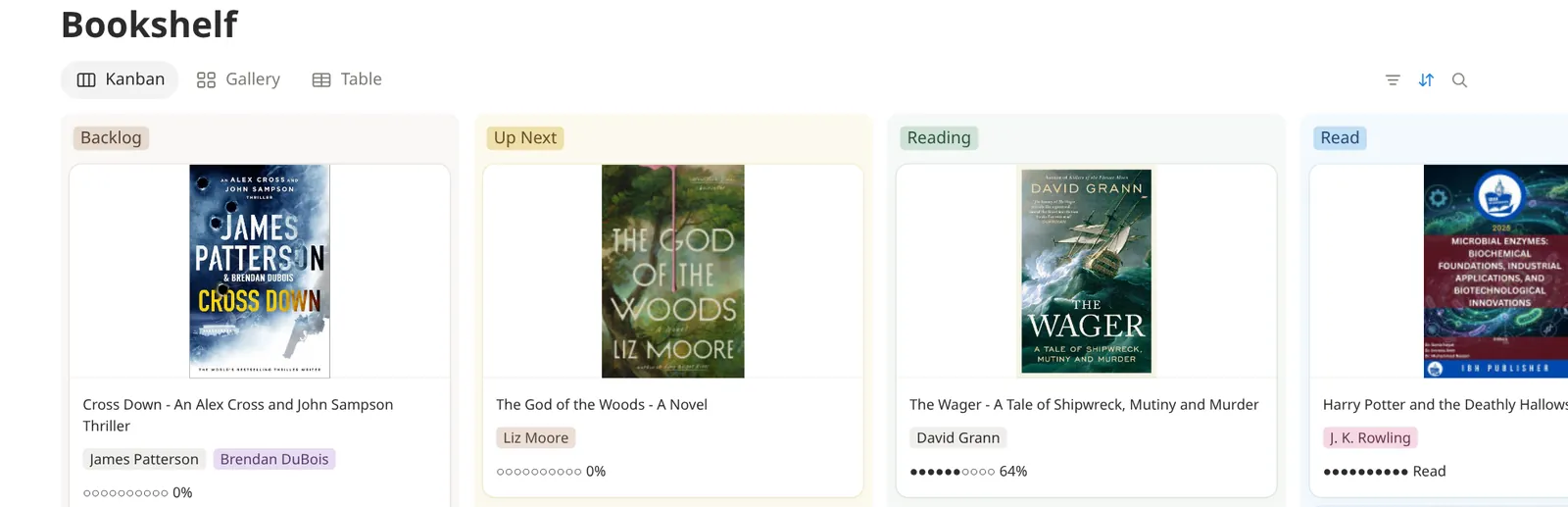
The book then shows up in a Notion database, which is the part I could never get from a separate reading app. The public shelf is a real Notion page you can open without an account: gallery and table views, covers, and a progress property.
If you would rather start from a reading list and add the search later, the Notion reading list template is the light version: statuses, a to-read pile, and no search. I reach for the search once the pile is long enough that pasting covers becomes the chore.
I wrote about this beginning on Indie Hackers: copying the author, the page count, and the cover into Notion by hand for my own reading list.
What it costs, and how to try it
On the pricing FAQ the template is $60, plus tax if it applies. You pay once. It is a one-time purchase, with no running costs, and it works with Notion’s free Personal Plan.
The free trial on that page includes the template, adding up to 10 books, and a test of the Goodreads import. That is enough to see the cover and the details land in your own workspace.
How I would choose:
- A blank Notion database, when you are learning properties, or when you want a free template and you are happy typing. The build guide is that path, and the Gumroad file linked there is the free template.
- Goodreads or StoryGraph, when you want their community, their stats, or their apps, and you are happy leaving Notion.
- NotionReads, when the shelf has to stay in Notion and the cover and the book data should arrive with the search.
A short checklist before you pick
Three questions, the ones I would ask a friend.
Does the book have to live in Notion, next to your notes? If it does not, StoryGraph or Goodreads may be enough, and you can stop here.
Do you already have a Goodreads export you want to keep? Export the CSV, then decide whether a plain Notion import is enough or whether you want the covers filled in. The import guide walks through both.
Will you add books by title, or only by ISBN? A barcode scanner is the copyright-page solution. A title search is the “I saw it on a table” solution. The live demo is a title search.
If those answers point at Notion, try the shelf before you pay.
Try the fill-in, then decide
Try the live demo and search for a book you actually own. No signup needed. If the cover and the author look right, open the public Notion page and see the same idea as a database. When you want that database in your workspace, start the free trial. You can add up to 10 books, or run a Goodreads import test. The $60 purchase is the one-time license on the homepage, once the trial has answered the question for you.
Sources
The prices and product details above come from these pages.
- NotionReads homepage for the “over 100 million titles” line, the one-click add, the Goodreads import wording, the $60 one-time price, the free Personal Plan note, and the trial (template, up to 10 books, Goodreads import test).
- Amazon press release, March 28, 2013 for the Goodreads acquisition announcement.
- Notion help: Import data into Notion for Settings → Import → CSV and
/csv. - The StoryGraph Plus, yearly, USD for $49.99 a year, the $4.17 monthly equivalent when billed annually, and the 30-day trial that ends on its own.
- StoryGraph on the App Store for the free-app description and the $4.99 monthly and $49.99 annual in-app purchases.
- Reddit thread on Notion book tracking and Thomas Frank’s ISBN scanner for how readers work around manual metadata.
- My Indie Hackers post for the same account of copying author, page count, and cover by hand.